고정 헤더 영역

상세 컨텐츠
본문
Basic Command
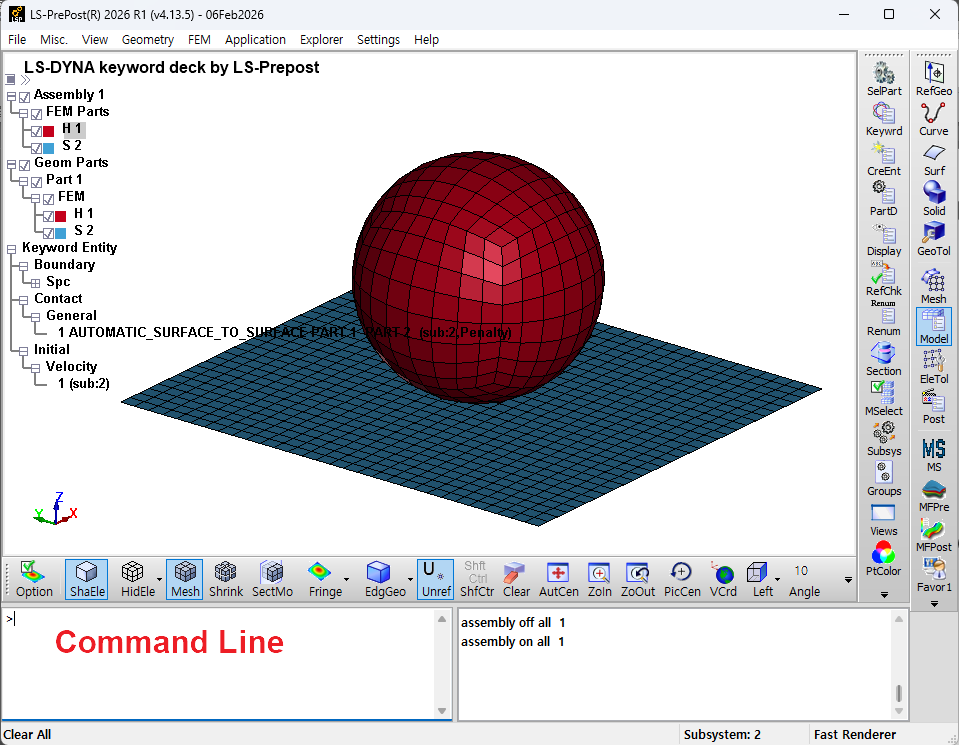
- 아래는 LS-PrePost의 명령줄에 입력할 수 있는 명령어 목록입니다. 이 목록은 기본적인 명령어 중 일부만을 포함하고 있습니다.
- 더 많은 명령어는 각 LS-PrePost 세션이 끝날 때 저장되는 lspost.cfile 파일을 참조하십시오.
- 그래픽 사용자 인터페이스와 상호 작용하는 동안 생성되는 명령어를 보려면 메시지 창의 출력을 확인하십시오.
더보기
Tip: 기본적으로 방향 명령(예: 모델 회전 시 생성되는 명령)은 명령 파일(lspost.cfile)에 기록됩니다. 설정 메뉴에서 "Record_orient"를 설정하면 이러한 명령을 필터링할 수 있습니다.
ac
center displayed parts fit to graphics area
anim backward
animate backwards
anim cycle
cycle animation forward and backward
anim first n
set starting state for animation to state n
anim forward
animate forward
anim incr n
set animation increment by n states
anim last n
set ending state for animation to state n
anim start
start animation
anim stop
stop animation
back
display back view
background R G B
change background color (R,G,B values range from 0.0-1.0)
background 1 1 1
change background color to white
background 0 0 0
change background color to black
beamprism 0
draw beams as lines, 1 to draw beams as prisms
bottom
display bottom view
c
comment line marker (like using $ in a keyword input file)
edge
display model in edge mode
edgelwidth i
change edge line width (i value ranges from 1-5)
endfull
restore GUI and graphics (see "full" command)
exit
exit LS-PrePost
feat
display model in feature mode
featang d
change feature angle to "d" degrees
front
display front view
full
change graphics area to full screen (Esc to restore)
grid
display model in grid mode
hide
display model in hide mode
home
reset display to default (top) view
import keyword model.k
import file "model.k" and add it to the current model
labelcolor R G B
change label color (see "background" command)
left
display left view
m i,j,k...
display part i,j,k where i,j,k are part IDs
m i:j
display part IDs from PIDi to PIDj
mesh
turn mesh on
meshcolor R G B
change mesh color (see "background" command)
meshlwidth i
change mesh line width (i value ranges from 1-5)
open command cfile
load command file named cfile
open d3plot d3plot
load d3plot file named d3plot
open d3thdt d3thdt
load d3thdt file named d3thdt
open keyword model.k
load file model.k
outline R G B
change outline color (see "background" command)
outlining 1
draw outlines on free edges
outlining 2
draw outlines on free edges and feature lines
pall
display all parts
parallel
change display to parallel projection mode
perspective
change display to perspective projection mode
pixtol i
change pick search tolerance to "i" pixels (default=100)
raoff
remove all reflections
raxy
reflect model about xy-plane
raxz
reflect model about xz plane
razy
reflect model about yz-plane
redraw
redraw model with current settings
restore
restore display to original position and remove all settings
right
display right view
rotang d
set rotation angle increment to "d" degrees
rstpart
restore last part that was turned off
rx
rotate model about global x axis (see "rotang" command)
ry
rotate model about global y axis
rz
rotate model about global z axis
shad
display modle in shaded mode
shademode 0
change display to flat shading, 1 uses smooth shading
showlegend 0
turn legend off, 1 turns it on
showtriad 0
turn triad off, 1 turns it on
shrink
toggle shrink mode on/off
state +n
advance display by n states
state -n
rewind display by n states
system "command"
issue a unix system command (ex: system "xterm&")
t
exit LS-PrePost
texon 0
turn textured fringing off, 1 turns it on
textcolor R G B
change text color (see "background" command)
timestamp 0
turn timestamp off, 1 turns it on
title "xxxxxx"
change title to xxxxxx
title 0
turn title off, 1 turns it on
top
display top view
userfringefontsize i
set graphics area font size(i value ranges from 0-6, 0 restores default)
view
display model in view mode (flat shaded mode)
wire
display model in wire mode
zin xmn ymn xmx ymx
zoom in where x and y values range from 0.0 to 1.0(0.0,0.0 is top left, 1.0,1.0 is bottom right)
zout
zoom out (undo the last zin)
+m i
add part i to display
+m i:j
add part from PIDi to PIDj to display
-m i
remove part i from display
-m i:j
remove parts from PIDi to PIDj from display
반응형
'Learning > ┣ LS-DYNA' 카테고리의 다른 글
| Additional Keywords (0) | 2026.09.08 |
|---|---|
| LS-PrePost - Keep Smooth (0) | 2026.08.06 |
| LS-PrePost - By Path (0) | 2026.08.06 |
| Manuals__Download/Order LSTC Product Manuals (0) | 2025.07.14 |
| 구조 EXPLICIT 1차요소 VS 2차요소 (1) | 2025.07.03 |
| job not started (0) | 2024.10.02 |
| LS-Prepost 툴바 메뉴 아이콘(이름) 표기 (0) | 2024.05.07 |


댓글 영역